# Dynamic keyword lists
A dynamic keyword field is a field that can display several columns of content, typically dynamically filtered depending on one or more other field values. It looks like this:
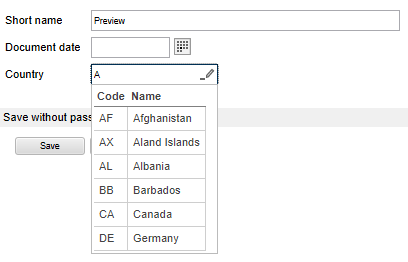
Dynamic keyword lists are a relatively advanced feature of ELO that requires scripting knowledge to work. They are available in the ELO Java Client and the ELO Web Client.
They can be used to:
- Display multiple columns of data
- Retrieve content dynamically (e.g. external databases, computed on the fly, ELO scripts…)
- Filter data based not only on the provided field, but also on other arbitrary fields (e.g. what the user has typed and a category that the user previously selected)
- Complete many other fields upon selecting an item (including read-only fields)
The use of a dynamic keywording list is defined directly in the metadata form:
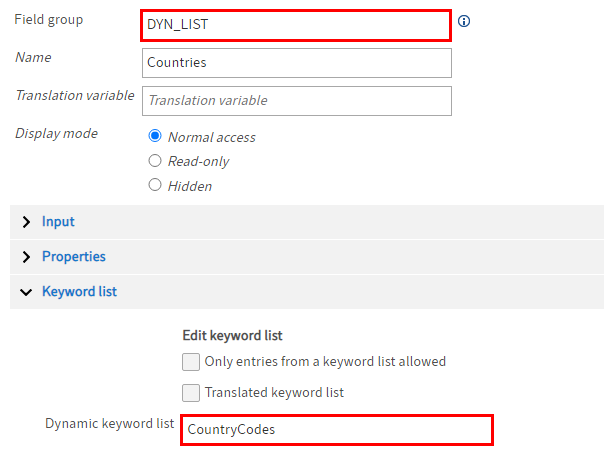
Create a field template.
Enter a value in the Field group field.
You need this value later on in the form designer.
In this example, the value "DYN_LIST" is used in the Field group field of the field template.
In the Keyword list area, enter the name of a script file in the Dynamic keyword list field.
The corresponding script must exist in the following folder:
Administration//IndexServer Scripting Base.
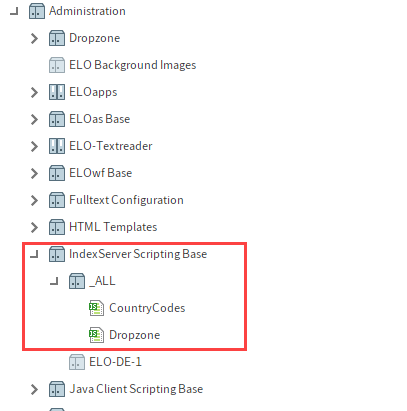
In this example, the script CountryCodes is entered. You will find a short version of the script in the following section Sample script.
To use the list in a form, you have to enter the value from the Field group of the field template in the form designer in the Group name field.
In this example, that is the value "DYN_LIST".

# Sample script
The CountryCodes script used in the example is a script that provides a static list of country codes and names:
importPackage(Packages.de.elo.ix.jscript);
importPackage(Packages.de.elo.ix.scripting);
function getDataIterator() {
    try {
        log.info("getDataIterator(SimpleDatabaseQuery");
        return new DynamicKeywordDataProvider(new CountryCodes());
    } finally {
        log.info(")getDataIterator");
    }
}
function CountryCodes() {
    var index = 0;
    var results = [];
    /* Utility function to filter a list of countries */
    this.filterCountries = function(filter) {
        log.info("filter: " + filter)
        filter = filter.toLowerCase()
        results = [];
        for (var i=0; i<isoCountries.length; i++){
            if (isoCountries[i].cname.toLowerCase().indexOf(filter) >= 0) {
            results.push([isoCountries[i].ccode, isoCountries[i].cname]);
            }
        }
        log.info("Nach Filter: " + results.length);
    }
/* Called when initializing a dynamic list (via declaration in the metadata form) */
    this.open = function(ec, sord, focus) {
        log.info("open");
    this.target = focus;
/*In this case the first field in the form is selected, but ideally a different one should be selected */
    var filter = sord.objKeys[0].data[0] || "";
    this.filterCountries(filter);
}
/* Called when initializing a dynamic list via ELOwf "Dyn. keywording map" field */
    this.openMap = function(ec, map, focus) {
        log.info("openMap");
        log.info(JSON.stringify(map));
        this.target = focus;
        var filter = map[focus] || "";
        this.filterCountries(filter);
    }
    this.close = function() {
        log.info("close()");
    }
    this.getNextRow = function() {
        var row = results[index];
        index++;
        log.info("getNextRow(" + row + ")");
        return row;
    }
/* The name of the columns */
    this.getHeader = function() {
        log.info("getHeader()");
        return ["Code","Name"];
}
/* The selected item's target */
    this.getKeyNames = function() {
        log.info("getKeyNames()");
        return [this.focus, "A_DIFFERENT_FIELD"];
    }
    this.hasMoreRows = function() {
        log.info("hasMoreRows()");
        return (index < results.length - 1);
    }
/* Either return an error message or leave it empty on success */
    this.getMessage = function() {
        log.info("getMessage()");
        return "";
    }
    this.getTitle = function() {
        log.info("getTitle()");
        return "Country Codes";
    }
}
var isoCountries = [
    {'ccode' : 'AF', 'cname' : 'Afghanistan'},
    {'ccode' : 'AX', 'cname' : 'Aland Islands'},
    {'ccode' : 'AL', 'cname' : 'Albania'},
    /* ... */
    {'ccode' : 'ZW', 'cname' : 'Zimbabwe'}
];
You will find more information in the following documentation: