# Configuration of ELO Modern Authentication (Auth2) (ELO 23.6 or higher)
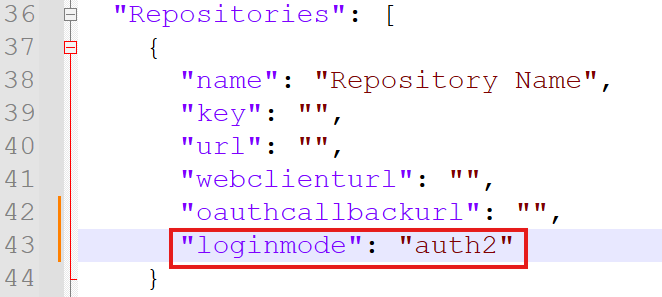
To use ELO Modern Authentication (Auth 2), an OAuth profile must be created. The appsettings.json file must be adjusted as follows: The "loginmode" variable must be incorporated into the "Repositories" node, if it does not already exist. The value "auth2" must be entered for ELO Modern Authentication (Auth2).
A new OpenID provider must be added for ELO Sync. Refer to the Add OpenID provider (opens new window) documentation for more information.
Select Microsoft from the drop-down menu.
Enter the name *elo_sync_oauth.
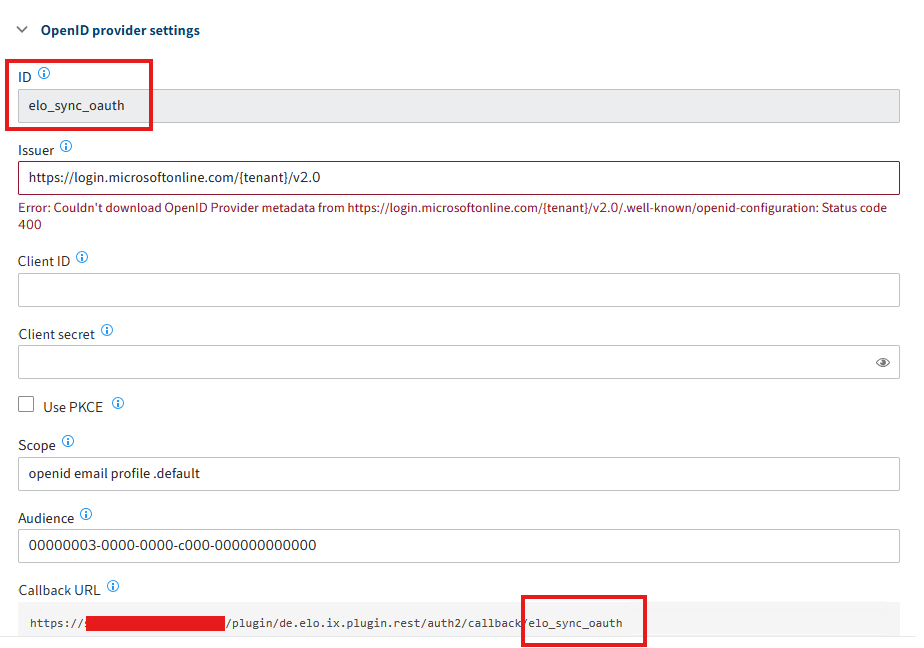
The interface may look different depending on the version, but you can find the ConfigID using the callback URL. In our example, it is elo_sync_oauth.
Enter the values from the ELO Sync appsettings.json in this dialog box:
- "ClientId" -> Client ID
- "TenantId" -> {Tenant}
- "ClientSecret" -> Client secret
In the Audience field, enter the value
00000003-0000-0000-c000-000000000000(Information: This value is the GUID for the Graph API).