# Configuration of ELO Auth (ELO 23.6 or lower)
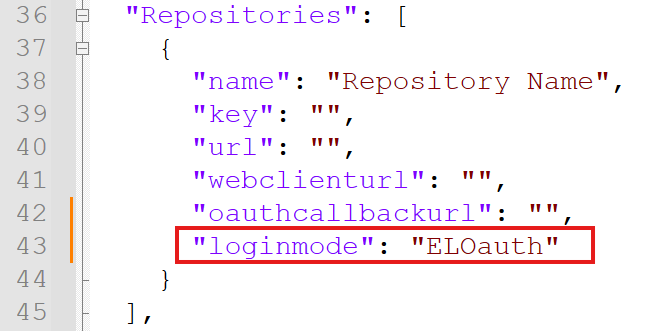
To use ELO Auth (Auth 1), an OAuth profile must be created. The appsettings.json file must be adjusted as follows: The "loginmode" variable must be incorporated into the "Repositories" node, if it does not already exist. The value "ELOauth" must be entered for ELO Auth.
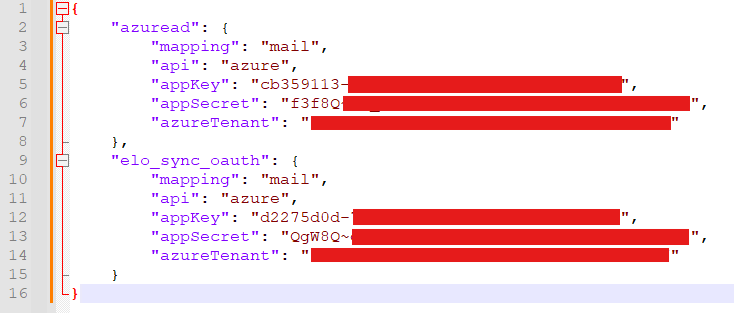
If you already have an OAuth profile, an additional configuration node "elo_sync_oauth" must be added to the file de.elo.ix.plugin.auth.json. This file is located under <InstallDir>\<ELOInstallFolder>\config\ix-<repository name>\ELO-<server name>-1\de.elo.ix.plugin.auth.json.
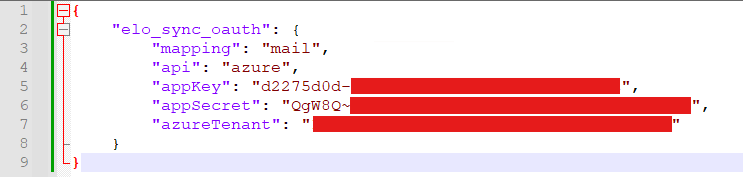
If you do not have an OAuth profile, you must create the file de.elo.ix.plugin.auth.json and insert the configuration node "elo_sync_oauth".
Please note
The following data must be taken from the ELO Sync appsettings.json (ClientId, TenantId and ClientSecret):
- "ClientId" -> "appKey"
- "TenantId" -> "azureTenant"
- "ClientSecret" -> "appSecret"
The ConfigID name in the ELO Sync appsettings.json under the OAuth node must be identical to the node name in the configuration file for OAuth (Example: "elo_sync_oauth").